 17:50 am
Upload POS Report
Drop the POS sales report to refresh the math.
Kitchen operations software for restaurants
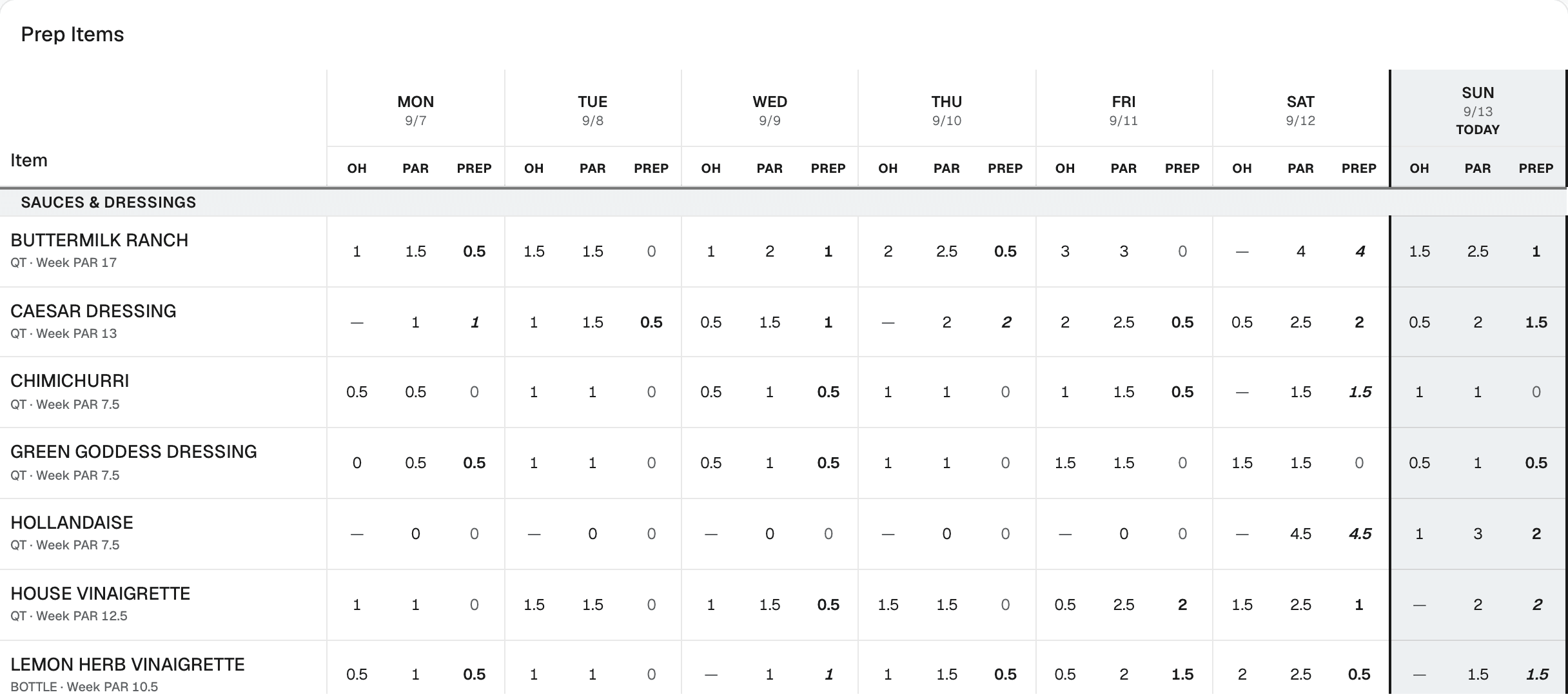
Yesterday's POS export becomes tomorrow's prep sheet and this week's supplier order, sized for each day of the week. Every number shows where it came from.

20–30%
less food waste
The problem
The par sheet was set once, by someone, and the menu has moved since. One number covers every day, so Saturday gets prepped like a Tuesday. Updating it honestly means doing the math by hand, so it does not get updated.
Before
| ITEM | MON | TUE | WED | THU | FRI | SAT | SUN |
|---|---|---|---|---|---|---|---|
| Buttermilk ranch | 2 | 2 | 2 | 2 | 2 | 2 | 2 |
| Caesar dressing | 2 | 2 | 2 | 2 | 2 | 2 | 2 |
| Chimichurri | 1 | 1 | 1 | 1 | 1 | 1 | 1 |
| Green goddess | 1 | 1 | 1 | 1 | 1 | 1 | 1 |
| Hollandaise | 3 | 3 | 3 | 3 | 3 | 3 | 3 |
| House vinaigrette | 2 | 2 | 2 | 2 | 2 | 2 | 2 |
Same number every day. Saturday sells twice what Tuesday does.
After
Sold
212
Sat, last 4 wks avg
Target
240
+5% buffer
On hand
61
counted 8:20 am
Make
179
on the prep sheet
8:25 am · the prep sheet reaches the pass
One chain. A gap anywhere in it sends somebody back to paper and guesswork.
A morning, start to finish
Not a dashboard. The running order of the shift, with the next step marked. Each tile reports its own state, so nothing needs opening to be checked.

Next · step 3
5 items still need a count before the prep list is complete.
Upload POS Report
Drop yesterday's export. Everything below recalculates.
Print Count Sheet
The clipboard, in the order the kitchen is walked.
Input Counts
Type what you walked. Rows match the paper.
Prep Sheet
Target, on hand, and what to make, per item, per day.
Review Product Mix
Four weeks of dishes sold, by day of week.
Order Builder
Quantities to the next delivery, by supplier.
One chain, in the order the shift happens. Nothing here has to be checked twice.
Drop yesterday's export. The math refreshes.
Item and modifier reports both parse, so an "add grilled chicken" still consumes a chicken breast. A confirm step stands between the file and the database. After the write, names the catalog does not recognize are listed for you to map, not dropped.

Step 01
7:50 am
Sun, Sep 13 · item report
3,838 rows
3,838 matched · 0 unmapped
Variance
What the chef sees · Monday
Braised pork shoulder
Actual
17.33 lb
Theoretical
13.19 lb
Impact
+$43.64/wk
Heavy 3 weeks running · avg +$43.64 → 3wk
What the line sees · prep sheet
Braised pork shoulder
Running heavy against the recipe. Portion to spec.
4 lb
No dollar figure reaches the station.
Instead of "food cost is up a point", it is a specific ingredient, running heavy for a specific number of weeks, worth a specific number of dollars. The cook never sees the dollar figure. On the prep sheet it reads as a portioning note.
Book a demo →How it works
Numbered on the home screen, in the order a manager actually does them. The times are from a real service week.
17:50 amDrop the POS sales report to refresh the math.
 28:00 am
The walk-the-kitchen worksheet, in walk order.
 38:20 am
Type in the on-hand numbers you walked the kitchen with.
48:25 amToday's target, what you counted, and the difference to make, per item.
 5Mon 10:00 am
Week-to-date sales by item. Spot what is trending up or down.
 6Thu 3:00 pm
Forecast order quantities by supplier and delivery day.
Prep
Prep is sized from what actually sold on that weekday. The weekend stops being under-prepped and the slow days stop being over-prepped. Both were invisible inside one food-cost number.
Ordering
Quantities are built to the real gap until the next delivery and then bent to the vendor's minimums and pack sizes, so orders stop arriving short or landing as a pallet nobody has room for.
Order · Tue, Sep 15
Meridian Meat & Seafood · delivers Thu, Sep 17 · covers 6 days
| Item | On hand | Need | Pack | Order |
|---|---|---|---|---|
| Pork shoulder, bone-in | 14 lb | 73.5 lb | 10 lb | 60 lb |
| Heavy cream | 6.2 qt | 43 qt | 12 qt | 48 qt |
| Parmesan wedge | 2.2 lb | 23 lb | 5 lb | 25 lb |
Paper
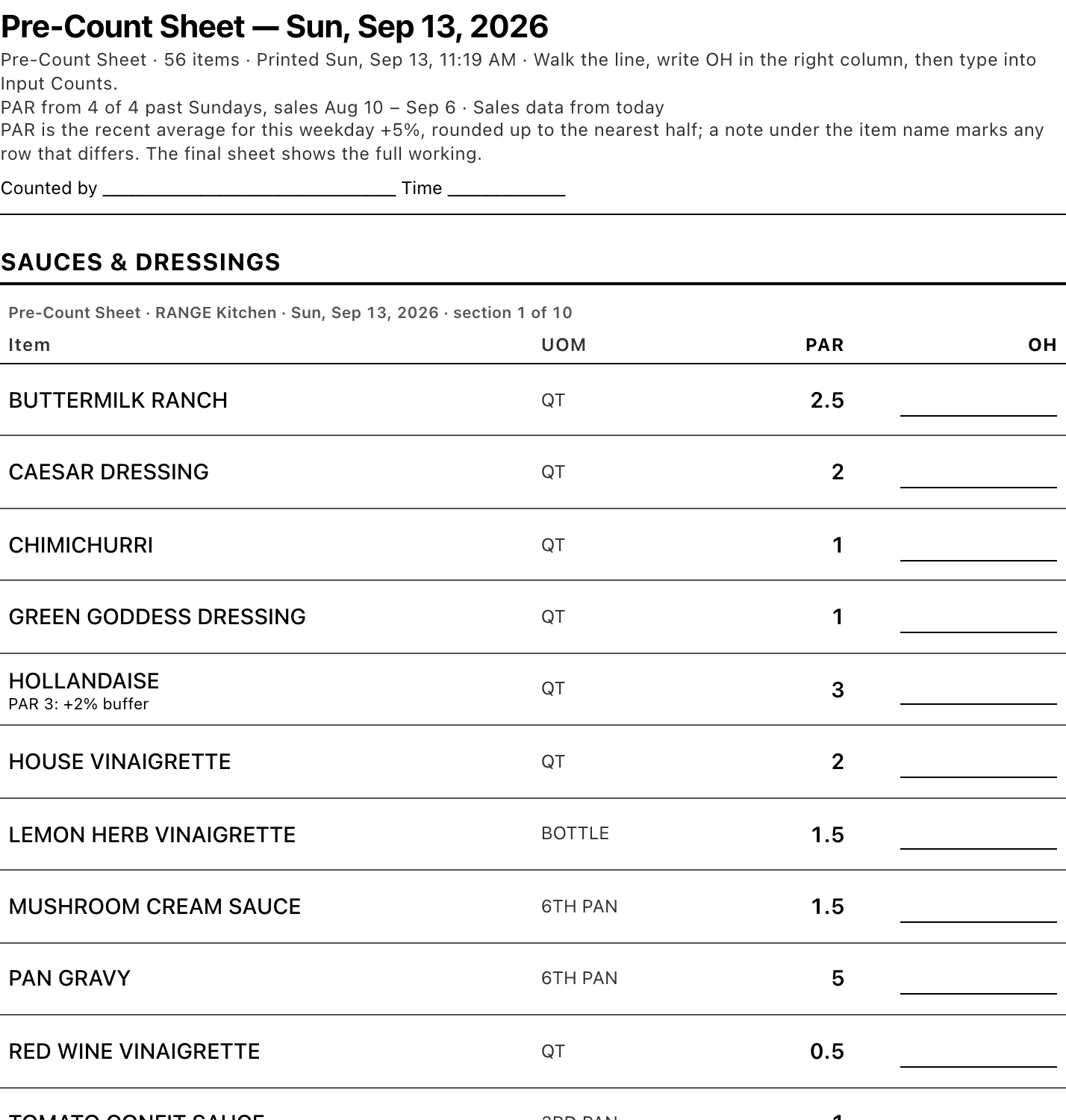
The printed sheet is what part of the team actually reads. It is a designed surface, not an afterthought, and it has to survive a photocopier and being read from across a room.
Why this and not a recipe platform
A recipe database can tell you what a dish costs. It cannot tell you what to make tomorrow or what to order on Thursday.
RANGE Kitchen uses your recipes the way a kitchen does: as the conversion between what sold and what has to be prepped and bought. Sales come in from the export your POS already makes, not by hand. Prep is sized for the weekday. The order is built to the next delivery. And the line reads a printed sheet, not a dashboard.
01
The first prep sheet exists the morning after the first upload. Recipe platforms fill from the top: enter every recipe, keep the costs current, then maybe forecast, as a paid add-on fed by a CSV. RANGE starts from the POS export and works downward.
02
A cost per portion is a finance number. A prep quantity for Saturday and an order for Thursday's delivery are kitchen numbers. Nobody on the line opens a dashboard; they read the sheet on the pass.
03
A tool the kitchen stops feeding stops being right within a week. This one is fed by the export your POS already writes and the walk somebody already does.
04
No tier to climb for forecasting, no separate charge for the thing you came for. Priced so a single restaurant can say yes.
| Recipe platforms | Enterprise back office | RANGE Kitchen | |
|---|---|---|---|
| Starts from real POS sales | Sometimes, by CSV, as a paid add-on | Yes | Yes, from the export every POS already makes |
| Runs sales through recipes | Costing only | Yes | Yes |
| Prep sized per day of the week | No | Yes, typically sold to groups | Yes |
| Order built to the next delivery | No | Yes | Yes, with the math shown |
| What the line reads | A screen | A screen | A printed sheet, in two languages |
| Set-up burden | Weeks of recipe entry, upload fees | Months of implementation | Recipes and order guides, then the first upload |
| Priced for one restaurant | Tiers plus add-ons | Custom quote | Yes |
Category descriptions reflect public product pages read on 13 September 2026. No competitor is named because the point is the shape of the tool, not the brand.
Who it is built for
Walks the walk-in at 8am with a printed sheet, enters counts on a propped tablet, prints the prep sheet for the line. Hurried, hands busy, often one-handed.
Reviews variance weekly, tunes buffers, builds and sends supplier orders. Sitting down, willing to read a table, wants to see where every number came from.
Same loop in every kitchen, one login that switches between them. Each kitchen's buffers, counts and delivery days are its own.
20–30%
less food waste
In a working kitchen running the RANGE loop.
Buffer changes, counts, orders and uploads are written to history, and every log has a screen.
The line sheet prints Spanish above English, from the same data as the screen.
"This is super streamlined, super easy, super solid, and really really smart. There are definitely other programs out there similar but this one is fast and furious and really intuitive."
Why RANGE Kitchen exists
Jon Peck
Founder, RANGE Kitchen
Prep quantity moves the number. It is decided daily, decided by judgment, and wrong in both directions at once: the weekend runs short while Tuesday goes in the bin. RANGE Kitchen started as a prep sheet for a kitchen I ran, not as a product.
Jon spent twenty years running restaurants, ending as Chief Operating Officer of two Dallas restaurant groups. This started as a prep sheet for a kitchen he ran. Ordering, variance and the bilingual print path were added only as the operation asked the next question.
About RANGE →Partners
RANGE Kitchen reads the item and modifier sales export your customers already download. We want to read it through your API instead, so their loop runs without a daily upload. What you get is a retention feature for one-to-ten-unit operators that you do not have to build. What we need is read access to item and modifier sales, and a marketplace listing when we are out of beta. We are choosing a first integration partner now.
In beta with a first group of kitchens
Bring one week of POS exports to the call. We size a real day, live.
Kitchen operations software for the daily loop. Sales come in from your POS export, recipes turn them into per-day prep targets, counts say what is on the shelf, and the difference drives the prep sheet and the supplier order. A kitchen can run tomorrow's service off it and nothing else.
The item sales export, and the modifier export if you sell modifiers that consume ingredients. Confirmed on Toast today. Most POS systems export the same two reports; send us a sample export before the call and we will tell you within a day whether yours parses.
No. It replaces the par sheet and the clipboard. If you already run a back-office platform, RANGE Kitchen sits in front of it and produces the numbers the line actually uses.
Yes. One login switches between kitchens, and each kitchen keeps its own buffers, counts, delivery days and history.
Your recipes and your order guides have to be in the system before the first prep sheet is right, because the recipes are what turn sales into prep. For the first group of kitchens we do the loading with you: bring your recipe list and your current order guides and expect two working sessions. Most kitchens start with the twenty items that drive prep and add the rest as they go. After that it is one POS export and one count a day.
Pricing is not published while the product is in beta; the first group of kitchens is priced individually. It will be a flat monthly price per kitchen with nothing extra for forecasting or ordering, and it will sit under what the back-office platforms quote a single restaurant.
RANGE Kitchen is in beta with a first group of kitchens. Book a demo to see it on your own numbers and to join the list. If you are a POS company or a platform that wants to partner on data access, use the form and pick Partnership.
The printed count sheet and prep sheet, and the counts screen on a tablet. Never a dollar figure. When variance finds an item running heavy, the prep sheet says so as a portioning note.
20–30% less food waste, in a working kitchen running the loop. Over-prep is bought food thrown away. Sizing prep to that weekday's sales instead of a par sheet set once removes most of it, and ordering to the next delivery instead of to a week removes the rest.